

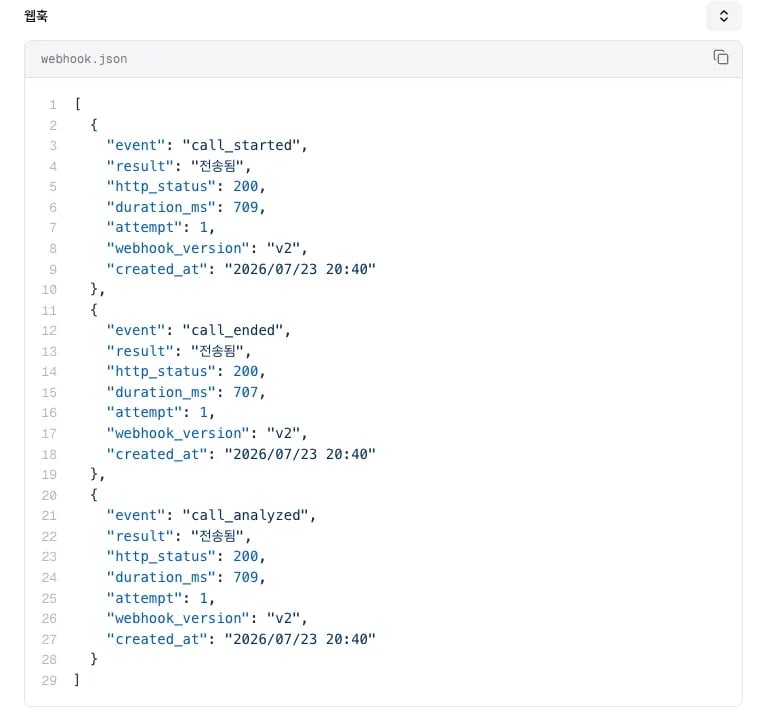
지원하는 이벤트
이벤트 이름은event 필드로 구분해요. operator_call_started와 operator_call_ended는 본문 키가 operator_call이고, 상담사 구간의 mid_call을 포함한 나머지 통화 이벤트는 call이에요.
call_ended에는 call_cost와 call_analysis가 없어요. 비용과 분석 결과는 call_analyzed에서 받으세요. 개인정보 마스킹을 켠 에이전트는 대화 내용, 요약, 도구 호출 인자와 결과를 가린 내용으로만 보내고, 추출 항목과 전화번호 필드는 원문 그대로 보내요. 통화 유형마다 이벤트가 오는 순서와 시점은 이벤트 라이프사이클에 있어요.
처리할 이벤트 고르기
한 통화에서 여러 이벤트가 오므로 하려는 일에 맞는 이벤트만 처리하세요.
재시도와 중복 처리 규칙은 전달 보장과 재시도에 있어요.
수신 서버 만들기
웹훅 요청을 받을 HTTPS 엔드포인트를 준비하세요. 아래 예시는 이벤트 이름으로 처리를 나누고200을 돌려줘요.
에이전트별 웹훅 URL 연결하기
에이전트마다 다른 서버로 받으려면 에이전트 설정에 URL을 넣으세요. 에이전트 URL이 없으면 워크스페이스 URL로 가요. 우선순위는 웹훅 유형 비교에 있어요.1
통화 데이터 웹훅 URL 넣기
에이전트 설정의 웹훅 설정 섹션에서 통화 데이터 웹훅 URL에 수신 서버 주소를 넣으세요.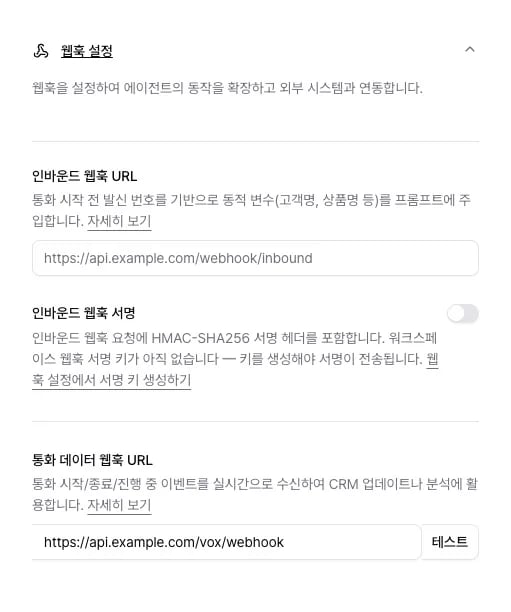
2
시험 요청 보내기
URL 옆 테스트를 눌러 수신 서버가 요청을 받는지 보세요.
3
실제 통화로 확인하기
통화를 한 건 걸고 통화 상세의 웹훅 로그에서 이벤트마다 전송 결과를 보세요.
관련 문서
- 웹훅 개요: 웹훅 유형과 우선순위
- 워크스페이스 단위 웹훅: HMAC 서명 검증과 보안 설정
- 웹훅 스키마: 이벤트별 필드 레퍼런스
- 이벤트 라이프사이클: 통화 유형별 전송 순서와 시점
- 통화 후 분석: 분석 결과 보기